Managed IT services for auto dealerships are measured on the busiest days. On a Saturday with a full lot, the showroom, the F&I office and the service drive are all using one dealer management system, and every slow second shows up in front of a customer.
A Saturday at 11:00
A salesperson has a customer ready to sign. The desk is waiting on a trade valuation. In the F&I office a credit application is open on a screen the next customer can see through the glass. At the service drive, an advisor is writing a repair order on a tablet that has dropped off the Wi-Fi in the corner by the cars.
Four small IT problems, one hour, and each is somebody’s sale.
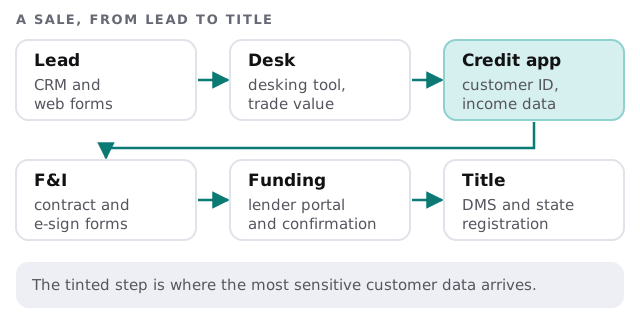
Five areas, five kinds of problem
- Showroom. Customer-facing screens and desks. Screens shouldn’t show another customer’s details, and sessions should lock when the salesperson walks away.
- F&I office. Credit applications, driver’s licenses, income and lender portals. This is the highest-risk room in the building.
- Service drive. Tablets and handhelds in a place with metal, open doors and weather. Wi-Fi is the usual culprit.
- Parts counter. Lookups and ordering, which stop when the system or the network does.
- Back office. Accounting, payroll and the vendor logins that hold the store’s money.
What the FTC rule says about customer information
The FTC’s Safeguards Rule defines a financial institution by what a business does. One of the rule’s own examples is an automobile dealership that, as a usual part of its business, leases cars on a nonoperating basis. Whether the rule reaches the rest of your financing activity is a legal question for your attorney, not an IT one.
For businesses it does cover, the FTC’s guide lists a designated Qualified Individual, a written risk assessment, multi-factor authentication, encryption of customer information and notice to the FTC within 30 days of discovering that unencrypted information on at least 500 consumers was acquired without authorization. Smaller businesses, with information on fewer than 5,000 consumers, are exempt from some provisions.
We explain what a rule like this asks of your systems. We don’t certify a store, and the legal question stays with your attorney.
When the main system stops
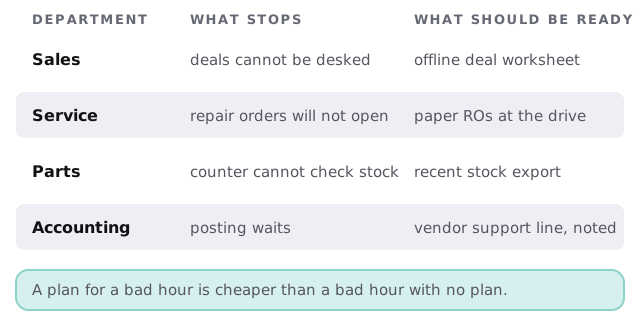
Most dealerships are one vendor outage away from a stalled store. The fix isn’t a second DMS. It’s a plan each department can follow for an hour or two.
People come and go
Sales floors turn over faster than most offices. Every salesperson who leaves is a login to the CRM, the DMS, the lender portals and the website’s lead inbox. Every one who joins needs the same set by their first shift, without borrowing a manager’s password. A checklist per role makes both directions routine, and it’s one of the things monthly care covers: access controls, kept current.
Demo devices, loaner laptops and handheld scanners need the same treatment. Each is assigned to a person, recorded, and wiped when it comes back.
Questions to ask any provider
- Which dealer management and CRM systems have you supported, and how do you work with their vendors?
- How do you cover the service drive’s Wi-Fi, and who checks it?
- What do you do about credit application data on screens and printers?
- What’s your plan for the store’s busiest weekend?
- How do you remove a salesperson’s access the day they leave?
We answer all five on the free IT check, then send a plan and a fixed quote.