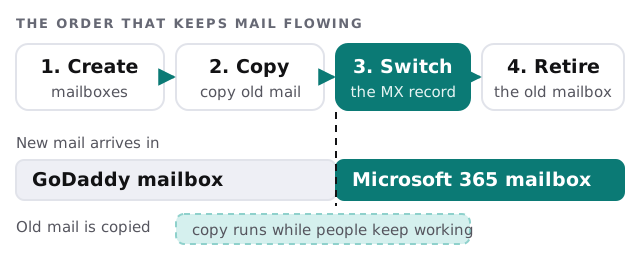
If your company email still lives at GoDaddy, the move to Microsoft 365 is less about technology than about order. Each mailbox has to exist in the new place first. The old mail is copied across next. Only then does the world get told to send new mail to the new address book.
Get the order wrong and mail bounces or lands in a mailbox nobody reads. Get it right and staff open Outlook on Monday and see the same folders.
Find out what kind of mailbox you have
The copy method depends on what GoDaddy is running for you. We find out three things before we plan anything:
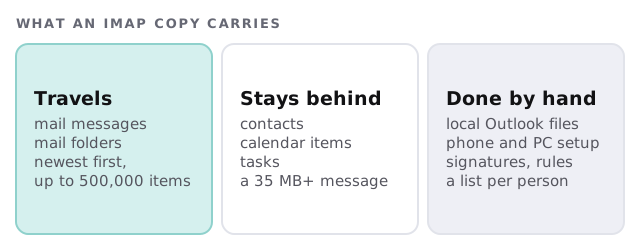
- Mailbox type. An IMAP-style mailbox and an Exchange-style mailbox move differently, and the difference decides whether contacts and calendars can travel.
- Where your DNS lives. In your GoDaddy account, in someone else’s, or at a web designer you have not spoken to in years.
- Who owns the domain login. Without it, nothing downstream can be verified.
GoDaddy describes the split plainly: IMAP migrations move email and folders, and Exchange migrations also move contacts and calendars. Microsoft agrees about IMAP and adds limits. It copies a maximum of 500,000 items per mailbox, newest first, and the biggest single message it can take is 35 MB. If one person has a mailbox with a decade of attachments, we know about it before cutover day, not on it.
Why the MX record goes last
The MX record is the public instruction that says where your mail should be delivered. Change it early and new mail goes to mailboxes that are still empty. GoDaddy puts it bluntly: do not switch the MX records until you are ready to receive mail in your new mailboxes. Microsoft’s guidance makes the same point, listing the MX change after the copy and before the old sync is stopped.
Where DNS lives changes who does the switch
| If your DNS is… | What happens at the switch | What we need |
|---|---|---|
| In your own GoDaddy account | GoDaddy says it updates the records for you on the migration date | Your approval and the date |
| In another GoDaddy account or another host | A TXT record proves ownership, then the records are changed by hand | Login to wherever the DNS sits |
| With a web designer | Same manual change, but someone has to be reachable on the day | An introduction and a time slot |
If DNS is a mystery to you, our notes on domain and DNS management for small business explain what each record does. If you are moving more than mail, the email migration service for small business page covers other sources.
What a cutover day looks like
Here is a Thursday that goes well. Mailboxes were created and licensed earlier in the week. The first copy ran quietly on Tuesday, and a second pass on Wednesday night closed most of the gap. At 4:30 on Thursday we make the MX change. A test message goes to every address. Staff sign in to Outlook on their computers and phones, and a one-page sheet tells each person what to expect.
A final catch-up copy runs overnight. Friday morning we confirm the counts, and GoDaddy stays untouched for a while longer. Once the new mailboxes have been used for a few days and nothing is missing, you cancel the old service yourself.
Why not just do it yourself
You can. Setting up Microsoft 365 for a five-person office is a reasonable weekend task if the mail is simple. The expensive mistakes tend to be the small ones: a shared mailbox that was never created, a forwarding address someone forgot, an old scanner still sending to the GoDaddy address.
A mail move succeeds when nobody has to ask “did this email get lost?” The copy is the easy part; the order of the steps is the job.
What we need from you
- A list of every mailbox, shared address and alias, including the scanner and the website form.
- Login for the domain and for wherever DNS is hosted.
- A named person to try the new setup first.
- A date that is not month-end, payroll day or the morning of a big client meeting.