Key takeaways
- A spreadsheet costs almost nothing to open. The real cost is the hours your staff spend retyping, checking, fixing and chasing it.
- Yearly cost is hours a week, times the cost of a staff hour, times 50 weeks, plus what mistakes cost you.
- A staff hour costs more than the wage. Benefits were 30 percent of private employers' pay costs in June 2026.
- Don't replace every sheet at once. Start with the one sheet that costs you the most, then measure again.
The hidden cost of spreadsheets is not the software. The sheet itself feels free. It came with your office software, or someone set it up years ago and it still works. The cost is the time around it. Someone retypes orders from email. Someone adds up the totals again by hand. Someone asks which copy is the latest, and someone fixes the row that got overwritten.
None of that shows up on an invoice, so it rarely gets added up. This post shows you how to add it up. You need about an hour, a list of your sheets and the people who work in them. At the end you will have one number: what your spreadsheets cost you each year. That is the number any fix has to beat.
Why a spreadsheet is never free
A spreadsheet is a blank grid. That is why it is so useful on day one. You can track orders, jobs, stock or clients without buying anything or asking anyone.
The trouble starts when the business grows around it. Unless someone builds checks into it, a sheet won’t stop a negative quantity or a customer entered twice. It doesn’t know that an order needs a price before it ships. So people do that checking themselves. The rules your business runs on end up in someone’s head instead of in the tool.
Look for four kinds of work around each sheet.
| Kind of work | What it looks like |
|---|---|
| Retyping | Copying an order out of an email, or a total from one sheet into another |
| Checking | Adding totals again, or comparing two copies line by line before something goes out |
| Fixing | Finding and repairing a row someone overwrote, deleted or sorted out of order |
| Chasing | Asking who has the latest version, or waiting for the one person who knows the sheet |
Count all four. Retyping is the easy one to see. Checking and chasing hide inside other jobs, so nobody thinks of them as spreadsheet time.
Step 1: Add up the hours
Ask the people who do the work. Don’t guess for them.
- List every sheet the business depends on, including the ones that live on one person’s laptop.
- For each sheet, write down who works in it.
- Ask each person how many hours a week they spend retyping, checking, fixing and chasing in it.
- Add the hours up across everyone.
Be conservative. If someone says “two or three hours”, write two. A low number you believe is more useful than a high one you argue about.
Step 2: Find what an hour of staff time costs
An hour of staff time costs more than the hourly wage. You also pay for things like paid leave, insurance and the employer’s share of payroll taxes. The U.S. Bureau of Labor Statistics measures this every quarter. In June 2026, private employers paid an average of $46.89 per hour worked. Wages and salaries were $32.82 of that. Benefits were the other $14.07, which is 30 percent (BLS).
Your number will be different. The people in your sheets may earn more or less than the national average. The best figure is your own. Take the total yearly payroll cost for those people and divide it by the hours they work in a year. If you only know the wage, multiply it by 1.4. That matches the national pattern, since $46.89 is about 1.4 times $32.82.
The example below uses $35 an hour. That is the starting guess our free IT check uses. It is well under the national average, so it keeps the example on the low side.
Step 3: Put a price on it
Now multiply. Take the hours a week, times the cost of an hour, times 50 working weeks. Then add what mistakes cost you. We use 50 weeks rather than 52 to leave room for holidays and time off.
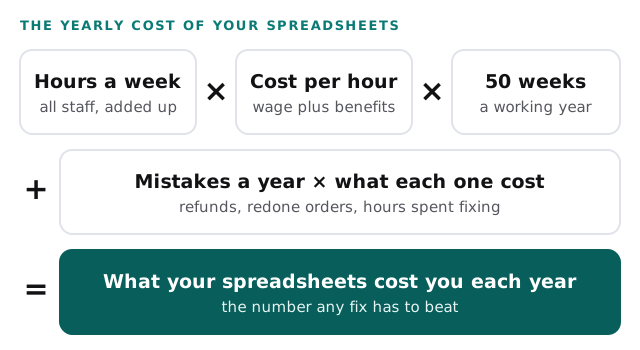
Here is a worked example. The numbers are made up to show the math. You can swap in your own in the calculator below it.
| Line | Example |
|---|---|
| People who work in the sheets | 3 |
| Hours a week each, retyping, checking, fixing and chasing | 4 |
| Hours a week in total | 12 |
| Cost of a staff hour | $35 |
| Staff time for the year (12 × $35 × 50) | $21,000 |
| Mistakes last year that reached a customer or forced a redo | 2 |
| What each one cost, in refunds, discounts or hours to fix | $300 |
| Mistakes for the year (2 × $300) | $600 |
| Total for the year | $21,600 |
In this example, three people each spend half a day a week in the sheets. That costs the business $21,600 a year, and nobody ever sees a bill for it.
What a spreadsheet mistake really costs
The hours are the steady cost. Mistakes are the sudden one, and they are harder to see coming.
Researchers have studied spreadsheet errors for decades. Raymond Panko reviewed fifteen years of that research. He found the studies agreed that spreadsheet errors are common and non-trivial (Panko). Nobody has to be careless for this to happen. A formula copied one row too far still gives an answer. So does a total that misses the last line. It just gives the wrong answer, and nothing on screen looks broken.
Some mistakes come from the software itself. Microsoft’s own support page explains that Excel removes leading zeros from numbers you type. It also rounds any digit past the 15th down to zero (Microsoft). So a ZIP code like 02134 becomes 2134. A 16-digit account number loses its last digit. The cell looks fine, and the data is wrong.
Large companies are not immune. In 2013, JPMorgan Chase settled SEC charges tied to its 2012 trading losses. The SEC’s announcement described weak accounting controls, including “spreadsheet miscalculations that caused large valuation errors.” The bank admitted the facts and paid a $200 million penalty (SEC).
Then there is the person problem. Look at your list and ask who understands each sheet. If the answer is one name, that sheet stops when they are out sick, on holiday or gone for good. Nobody else knows which tab feeds which, or why one column must never be sorted. That risk isn’t in the math above. It shows up the week they leave.
So there are two things you are really trying to avoid. One is a wrong number reaching a customer. The other is a business that stalls when one person is away.
Why the usual software pitch makes it worse
When the cost finally gets noticed, the usual answer is a new platform. A vendor shows a demo where every sheet is replaced at once, and it looks clean. Here is how that can go wrong for a small team.
It replaces everything at once. Your team has to move years of data and learn new screens while doing their normal jobs. Until the move is done, they keep the old sheet going too. For a while, that is more work, not less.
It is built for an average business. Yours has its own steps, like a discount rule or an approval only one customer needs. When the platform can’t hold a step, someone exports the data to a spreadsheet to finish the job. The sheet comes back, now with a subscription attached.
It adds another login and another bill. That is one more place for your data to live. It is also one more account to close when someone leaves.
The vendor gets paid either way. A subscription is billed whether or not your hours come back. Nobody in that deal is measuring the number you just worked out.
None of this means software is bad. It means the starting point is wrong. The first question isn’t “which platform?” It is “which hours, and how do we get them back?”
What to look for instead
Start from your list, not from a product. Then hold any fix, ours included, to these tests.
| Ask for | Instead of |
|---|---|
| A fix for the one sheet with the highest yearly cost | A platform that replaces every sheet at once |
| Work that connects the tools you already use | A new tool your team has to move into |
| A trial on your real work before anything switches over | Switching first and finding the gaps later |
| One place where each record lives, so nobody retypes it | Another copy of the same data |
| A record of who changed what, and when | A file anyone can overwrite |
| Written instructions, so it never depends on one person | A system only the builder understands |
Then measure. Once a fix is live, ask the same people the same question. How many hours a week does it take now? The difference, times your hourly cost, times 50, is what the fix is worth. If someone selling you a fix won’t help you measure that, ask why.
What this looks like in a real build
Here is one we built. It is an inventory system and online catalog for a diamond retailer. Staff track every stone from intake to memo to sale. A stone is “on memo” when it is out on approval with another dealer or a client, and it still belongs to the retailer while it is gone. Customers see the price their own account allows.
Every rule in that paragraph would be a manual check in a spreadsheet. Is this stone already out on memo? Which price does this customer get? Who has the latest copy? In the system, each stone has one record, and each customer sees only their own price.
You don’t need a diamond business for this to apply. Swap “stone” for job, order or client, and the shape is the same. Pictures only go so far, though. The useful part is seeing how a build like this is put together, screen by screen.
Behind the scenes
Want a behind-the-scenes walkthrough of a real build?
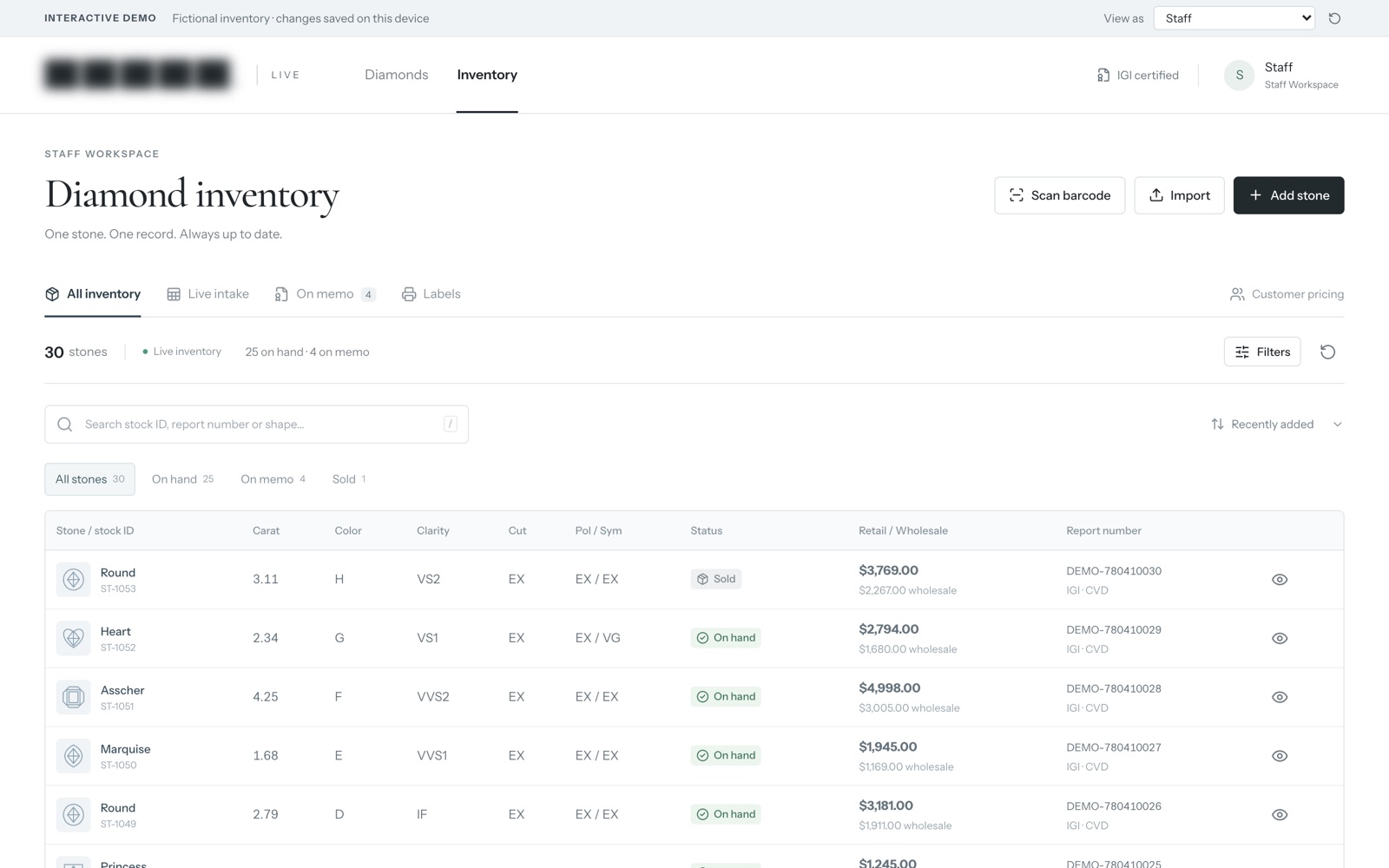
We will take you through it screen by screen: what each person sees, how a record moves through it, and why we built it that way. Then we can talk about the task that costs you most.
Frequently asked questions
How do I work out what one staff hour costs?
Take the total yearly payroll cost for the people who work in the sheets, including benefits and the employer's payroll taxes. Divide it by the hours they work in a year. If you only know the wage, multiplying it by 1.4 gets you close to the June 2026 national pattern.
When is a spreadsheet the right tool?
When one person owns it, nobody retypes data into it from somewhere else, and a mistake would be caught before it reaches a customer. Plenty of sheets pass that test, and those can stay.
Do we have to replace all our spreadsheets at once?
No. Fix the sheet with the highest yearly cost first. Ask the same people how many hours it takes them now, then decide whether the next sheet is worth it.
Sources
- Compensation costs for private industry workers averaged $46.89 per hour worked in June 2026 (U.S. Bureau of Labor Statistics)
- Spreadsheet Errors: What We Know. What We Think We Can Do (Raymond R. Panko, EuSpRIG)
- Keeping leading zeros and large numbers (Microsoft Support)
- JPMorgan Chase Agrees to Pay $200 Million and Admits Wrongdoing to Settle SEC Charges (U.S. Securities and Exchange Commission)
About the author
Andy Kang, AI Partner Team. Andy Kang writes the blog for AI Partner Team, which builds AI tools and internal apps for small businesses alongside managed IT and IT projects. The blog shows the math and the reasoning behind that work, so you can check it against your own business.
- Every fact links to the page it came from, listed under Sources.
- Example numbers are labelled as examples, and you can swap in your own.
- Builds are shown on sample data, with no client names or client figures.