AI automation for landscaping companies has an unusual starting point: the weather. A business that depends on dry ground, mowing windows and short seasons can’t plan the way an office does. One forecast changes sixty stops.
We build small AI tools and internal tools for the parts that follow. Your operations lead decides what the day is. The tool handles the ripple.
Rain at 6am
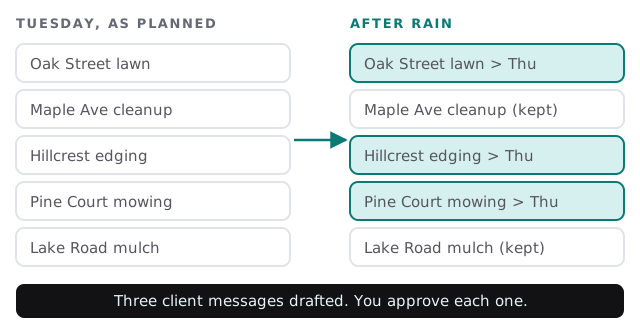
When you call a rain day, the tool lists every affected stop, finds the next open slot for each client’s usual service, and drafts a short message: “Rain has moved your visit to Thursday.” You skim, fix the odd exception, such as a client with an event on Thursday, and approve. Without a tool, this is an hour of calls and texts at the worst moment.
Two businesses under one logo
| Maintenance routes | Install projects | |
|---|---|---|
| Rhythm | Weekly or biweekly stops | One-off jobs with phases |
| Pain | Weather, missed visits, “did you come?” | Slow estimates, change orders |
| Best first tool | Rain-day messaging and route updates | Estimate drafts from site notes |
| Measure | Visits completed as scheduled | Time from site visit to sent estimate |
If you run both, pick one to begin with. Doing both at once usually means doing neither well.
From site visit to estimate
Spring means a stack of walkthroughs. The estimator takes photos and voice notes: a bed to edge, a patio to replace, a drainage question. A tool turns the notes into a structured scope, a material list and a first-draft estimate from your own price list, with the unknowns flagged for a second look. The estimator corrects it and sends it the same day.
The week, by role
- Owner. A Monday summary: stops completed, renewals due, estimates waiting.
- Estimator. Notes to drafts, and a list of quotes with no reply after a few days.
- Operations manager. Reshuffles, crew availability and equipment due for service.
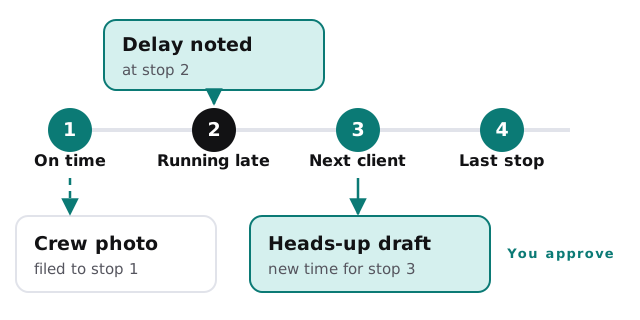
- Crew leader. Photos and notes in the usual way. No new forms.
- Office. Client messages drafted, invoices flagged, reviews requested after good visits.
Contracts that renew themselves, with a person watching
- List. Seasonal contracts coming up for renewal or ending.
- Draft. A renewal note referencing what was done this season.
- Review. The office edits any note where pricing or scope has changed.
- Send and record. The result is logged against the client.
The software around a crew
- Scheduling and routing. Stops, crews and client records.
- Estimating and proposals. Price lists and quotes.
- Accounting and payments. Invoices, deposits and card payments.
- Equipment logs. Mowers, trucks and trailers due for service.
If you’d like to try a simple first connection yourself, setting up Zapier for your team walks through it.
Questions to ask any provider
- Can I see every client message before it goes out?
- What does it do when two crews or two clients clash on a slot?
- Does it use my price list, and what does it say when an item isn’t in it?
- Where are the photos and notes stored, and who can see them?
A Thursday in April
Three estimators’ walkthrough notes from the week are already drafts. The office has six of them to correct and send before lunch. Two clients who asked for quotes on Monday would normally have waited until Friday. Instead they have a proposal while the idea is still fresh, which in spring is often the whole difference between winning the job and watching a competitor’s truck arrive first.
What we need from you
Your price list, a sample week’s routes, how you currently tell clients about delays and the systems your office uses. We return a plan and a fixed quote after the free IT check. A real person replies within 1 business hour, Monday to Friday, 9am to 5pm Pacific.
A lawn is mowed or it isn’t. The client’s trust depends on hearing which, before they have to ask.