AI automation for event planners starts from one uncomfortable fact: the same detail lives in five places. The guest count is in the client’s email, the caterer’s quote, a spreadsheet, the seating chart and your head. When it changes, you are the sync mechanism.
We build small AI tools and internal tools that keep those copies agreeing. A person on your team approves anything a client or vendor reads.
Count down from the event, not up from the inquiry
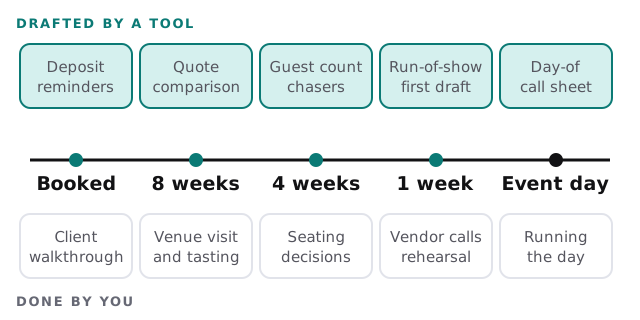
Planners think in countdowns, so the tool should too. Each event gets a plan that works backwards from the date: contract and deposit, vendor confirmations, final guest count, run-of-show, day-of contacts. The tool watches for the next missing item and drafts the nudge.
Sorting the vendor thread
An event can generate hundreds of vendor messages. A tool reads them as they arrive and files each one:
| What arrived | What the tool does | What you do |
|---|---|---|
| A quote or revised quote | Pulls the figures into your budget sheet and flags what changed | Accept or push back |
| A “can you confirm” question | Looks up the answer in the event record and drafts a reply | Check and send |
| A change of time or access | Updates the schedule draft and flags clashes | Decide what moves |
| A certificate of insurance | Files it with the venue record and notes the expiry | Nothing |
Why a record beats a better inbox
An inbox is in the order things arrived. An event is in the order things happen. A tool that converts one into the other is the whole value.
Guest changes, once
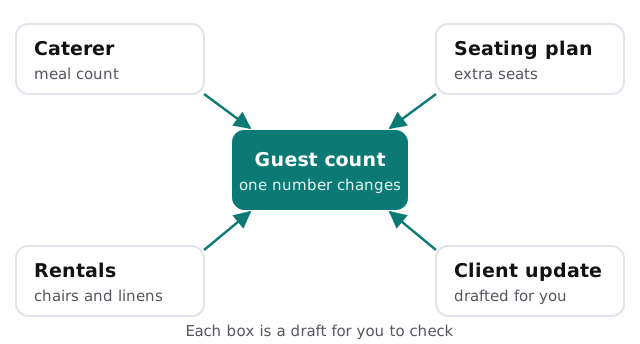
The tool doesn’t decide whether eight more guests fit. It tells you which documents now disagree with the number, and drafts each corrected version for review.
The day-of sheet
- Collect. Pull times, contacts and load-in details from the record.
- Draft. Build the run-of-show in your house format, with each vendor’s arrival window.
- Check. Flag overlaps, such as two deliveries at the same dock at the same time.
- Print. You edit, approve and hand it out.
Software you probably already run
- Event or CRM software. Inquiries, proposals, contracts and payments.
- Budget spreadsheets. Still the planner’s favorite, and fine.
- Floor-plan and seating tools. We leave the design alone and read the headcounts.
- Shared drives and email. Where the vendor thread really lives.
For a lightweight start on your own, setting up Zapier for your team shows how a form response becomes a row and a reply draft.
The Friday before a wedding
At 4pm the florist emails that the arch will arrive an hour later than planned. By 4:05 your phone shows the change, the two vendors it touches and a drafted note to the photographer about light. You approve the note, adjust one line and go back to the rehearsal. Without the record, you’d be scrolling for the thread.
Questions to ask any provider
- What does it read, and can it send anything without me?
- If a vendor’s email is ambiguous, does it guess or flag it?
- Can I see which email each number in the sheet came from?
- What happens to my clients’ details when I stop using it?
The weeks that hurt
Wedding season and the corporate holiday run both pile events on top of each other. The tool matters most then, because planners are juggling several countdowns at once and the shortest one always shouts the loudest.
What we need from you
One recent event’s emails and sheets, your run-of-show template and your list of trusted vendors. We return a plan and a fixed quote after the free IT check. A real person replies within 1 business hour, Monday to Friday, 9am to 5pm Pacific.
Guests remember the evening, not the spreadsheet. The spreadsheet’s job is to make sure nobody has to think about it.