AI automation for consulting firms has an unusual risk and an unusual payoff. The risk is that your product is judgment and your reputation is accuracy, so nothing can be allowed to make things up. The payoff is that so much of a consultancy’s time goes into work that isn’t judgment at all.
We build small AI tools and internal tools around the systems your team already uses. A consultant approves everything a client sees.
Sort the work before you automate it
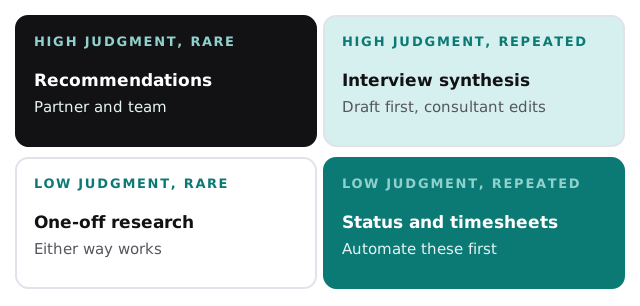
Recommendations and framing belong to the partners and always will. Interview synthesis sits in the top right: it repeats on every engagement, but it needs a consultant’s judgment at the end. Status updates, timesheet reminders and slide formatting need almost none.
Where one engagement leaks hours
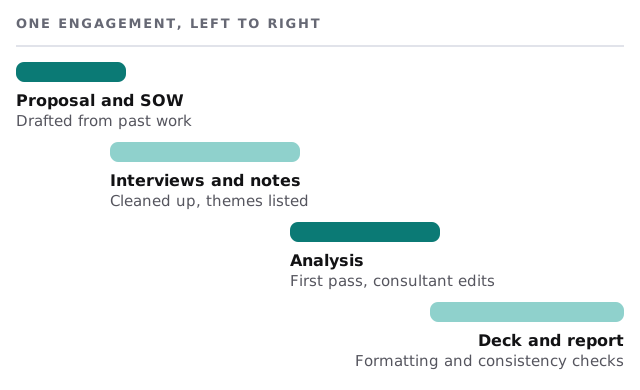
Proposals and statements of work
A request for proposal arrives and someone opens the last similar one. The tool searches your cleared past work, assembles a draft with relevant case descriptions, and marks every paragraph with where it came from. The partner rewrites the part that makes the proposal specific.
Interviews
Calls are recorded with consent and transcribed. The tool cleans the notes, lists recurring themes with quotes and the interviewee each came from, and leaves the interpretation to the consultant. If you’d like to try that part yourself first, our guide to recording and summarizing meetings with AI walks through it.
Decks and reports
Before delivery, a pass that checks number formats, source notes, terminology consistency and that every chart’s figure matches the table behind it. It lists problems and changes nothing without asking.
Back office
Friday timesheet reminders written to each person’s actual gaps, status summaries drafted from the project plan, and invoice drafts waiting for the partner.
Who feels it, and how
- Partners get proposals that start from a real draft instead of a blank page, and stop being the person who chases invoices.
- Managers get a first pass on interview themes and a status draft that already matches the plan.
- Analysts spend fewer hours on formatting and more on the analysis they were hired to learn.
- The operations lead, if you have one, sees timesheet gaps early in the week, not at invoicing time.
A Friday, once it’s running
A manager finishes the last of nine interviews on Thursday. By Friday morning the transcripts are cleaned, six themes are listed with the quotes that support them, and two interviewees’ contradictions are flagged. She spends the morning arguing with the themes instead of making them. At three, the tool lists the three people who haven’t filled in time and drafts a nudge for each, which the operations lead sends.
The software around a firm
| Category | Typical examples | What a tool adds |
|---|---|---|
| CRM and proposals | Pipeline tools, templates | Finds past work, drafts the first pass |
| Time and billing | Timesheet and invoicing software | Chases gaps, drafts invoices |
| Document storage | Shared drives, knowledge bases | Search with sources |
| Notes and calls | Meeting recorders, transcripts | Clean notes and themes |
| Presentations | Slide software | Consistency checks |
We don’t claim to have integrated any product by name. Before anyone on your team starts pasting client material into a chatbot, it’s worth having a written rule; our guide to writing an AI use policy for your small business is a good starting point.
Rules we’d build in
- Client material stays in the engagement space it belongs to.
- Every number and quote shows its source.
- Anything the tool can’t source is marked, not smoothed over.
- Nothing is sent to a client without a consultant approving it.
Where to begin
Name the task that costs your most senior people the most evenings. We’ll return a plan and a fixed quote after the free IT check. A real person replies within 1 business hour, Monday to Friday, 9am to 5pm Pacific.
Clients pay for what you conclude. Let software carry what comes before and after the conclusion.