Managed IT services for travel agencies cover an unusual kind of file. A trip is a bundle: an itinerary, supplier confirmations, a passport scan and a payment, all belonging to someone who will soon be in another country. When it works, no one thinks about the systems. When it doesn’t, a client is stuck somewhere with a booking number that you can’t find.
The trip file
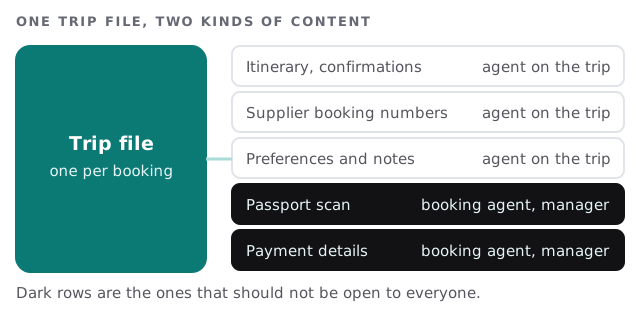
One folder or record per booking, named by client and date, gives every agent the same starting point. Split what anyone on the trip needs from what only the booker should see. Then decide how long the sensitive part stays after the trip. Holding old scans for no reason adds risk and no value.
Many suppliers, many logins
Agencies book through many suppliers, from airlines and tour operators to cruise lines and hotel groups. Each has an agent portal. Each was set up by somebody, with their email, at some point.
- List every portal, with the registered email and who else knows the password.
- Move shared logins into a password vault, with named access and a record of who opened them.
- Switch to individual users wherever the supplier supports them.
- Use a role address such as bookings@ for portal contacts, not one agent’s name.
- Review the list quarterly, and close accounts for agents who left.
A portal registered to a departed agent’s personal address is a classic: the supplier sends a reset link to a stranger or to nobody.
What the agency needs, trip by trip
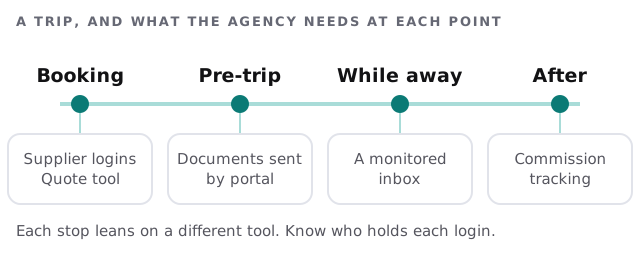
While the client is away
Clients write when a flight is cancelled or a hotel loses a booking. Choose the channel you tell them to use, make sure someone reads it and test that it works from abroad. We can help set up a shared inbox or a phone line that rings more than one person. We don’t provide the person who answers.
Agents who work anywhere
Many agencies are small, with agents at home or on the road. Each laptop and phone should lock itself and support remote wipe, and each agent should sign in with a second step. That’s the minimum, given what a laptop can hold.
- Use the agency’s email, not personal webmail, for client details.
- Keep trip files in the shared place, not on a laptop’s desktop.
- Don’t discuss payment details in chat apps without a plan for them.
Documents that travel with the client
Itineraries, vouchers and visa letters go out as attachments, and clients forward them on. Send a link to a protected copy where you can, so a revised itinerary replaces the old one instead of competing with it. Tell clients plainly which version is current. It saves a lot of calls from a hotel desk.
Busy months
Most agencies have a booking rush and quiet stretches, though the dates vary with the kind of travel you sell. Mark your own rush on a calendar. Make updates, new hires’ accounts and device swaps happen before it, and keep a change freeze during it, except for urgent fixes.
When an agent leaves
The portals, the client list and the phone number are the three things that walk out the door. Close the agent’s logins, move their trips to a named colleague, forward their mailbox and check that no supplier portal lists them as the only contact.
What we need from you
- Your booking, quoting and accounting tools, and who administers them.
- The list of supplier portals, even a rough one.
- How you store passport scans and payment details now.
- Your busy months.
Monthly care covers access controls, backups and updates. The free IT check ends in a plan and a fixed quote.
A client abroad needs one thing from you: to be found in the file. Keep the file where you can find it, and lock the part that isn’t for everyone.