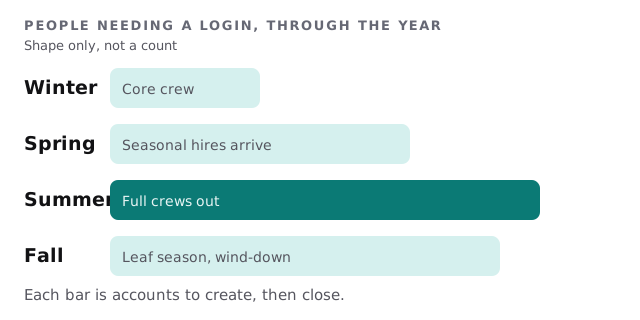
Managed IT services for landscaping companies mostly come down to people and phones. In colder regions the business has a small core crew all winter. In spring, seasonal workers arrive in a rush, and each needs a schedule, a route and some way to record the job. In fall, many leave again.
March: the crew doubles
Picture the first Monday after the ground thaws. Six new people arrive at the yard. Someone hands out phones, someone else adds each person to the scheduling app, and a crew lead lends a login to the one whose account wasn’t ready. By lunch everyone is working, and by summer nobody remembers who is using whose login.
What a landscaping company runs
- Scheduling and routing. Who goes where, in what order, with which equipment.
- Estimating and proposals. Often built on a phone at the property, then moved to the office.
- Invoicing and payments. Card reader, recurring billing for maintenance contracts, and statements.
- Photos and notes. Before-and-after pictures, plant lists, gate codes and irrigation notes.
- Equipment tracking. GPS on trucks and mowers, hours, service dates.
- Payroll and timekeeping. Crew hours, often captured on the same phone as the route.
Several of these are one product. Many small companies still use three, and the gaps between them are where jobs get retyped. An estimate approved on a customer’s lawn should become a scheduled job without anyone copying a number from one screen to another. If it doesn’t, ask which step is done by hand, because that step is where the mistakes and the delays come from.
Spring is also when equipment returns from winter storage. Trackers need their subscriptions checked, phones need updates they missed and the card reader needs a charge. A short checklist run in early March catches these before the first full day.
The first-week routine for seasonal staff
- Create the account the week before. Not the morning of the first shift.
- Give the minimum. Schedule and route, plus time entry. Billing and customer lists stay with the office and crew leads.
- Set the device lock first. A screen lock, an update schedule and a way to wipe the work apps if the phone goes missing.
- Write the end date down. Put it in the same list you use to remove people, then check the list in October.
- Take the equipment back with the access. Phones, chargers, fobs and gate remotes leave the same day the accounts close.
Who sees what
Gate codes, alarm codes and client addresses are exactly the kind of detail that shouldn’t walk out of the yard on a former employee’s phone. A simple access map solves most of it.
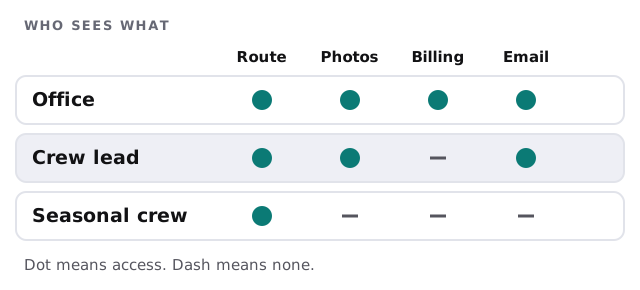
If a crew member needs a piece of information to do the job, give it to them in the route notes for that stop, not as a full customer list.
The shop and the yard
A landscaping yard usually has one computer, a printer and a wireless network nobody has touched in years. Treat it like an office. Give the shop PC its own login, keep the Wi-Fi password off the whiteboard, and make sure the machine that holds customer records is backed up. Trackers on trucks and mowers belong to someone by name, with the account, the email address and the billing recorded.
What we need from you
- Your list of apps and who set each one up.
- How many devices go out in spring, and who owns them.
- Your seasonal hiring pattern, so we can plan for account batches.
- Where customer notes and photos live at the end of a job.
Monthly care covers access controls, backups and updates. We start with the free IT check, which ends in a plan and a fixed quote.
The season starts on one day and ends on another. Put both dates on the account.