Managed IT services for gyms have one measurable moment: 5:45 on a weekday morning, when the first members tap their fobs and expect the door to open. A gym’s technology is judged in seconds, at a door, in front of the people paying for it.
What happens when someone taps in
The front door looks simple. Behind it, a chain decides who is allowed in.
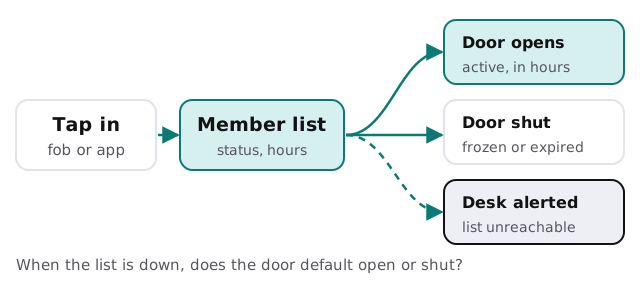
The member list ties together billing, door access and class booking. If billing marks a member as frozen but the door controller isn’t told, that person walks in free. If the list can’t be reached and the door shuts, you have a queue and a manager apologising. Both failures come from the same cause: three systems that don’t agree.
Keep the lanes apart
A gym has an unusual mix on its network: members’ phones, a payment terminal, door controllers, cameras, TVs and a front-desk PC holding every member’s details. They shouldn’t all share one network.
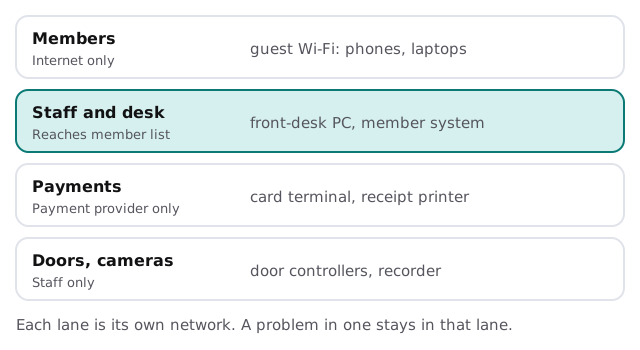
- Guest Wi-Fi for members. Internet only, with nothing else in reach.
- Staff and desk. The member system and the front-desk PC, behind real logins.
- Payments. The card terminal on its own lane, talking only to its provider.
- Doors and cameras. Controllers and the recorder, reachable by staff only.
The tools a gym runs
| Category | What it does | Where it goes wrong |
|---|---|---|
| Member management and billing | Plans, freezes, recurring payments | Two staff editing the same record |
| Access control | Fobs, app entry, schedules | A cancelled member’s fob still works |
| Class and appointment booking | Spots, waitlists, trainers | Double bookings after a sync failure |
| Point of sale | Smoothies, retail, day passes | Terminal freezes at the rush |
| Cameras and recorder | Floor, entrances, cash handling | Footage overwritten, no one checks it |
| TVs, music, signage | The atmosphere | A cable box that needs a restart |
A studio is not a big club
A boutique studio with one room and a tablet at the door has a smaller version of the same problems. The booking app is the member list, the tablet is the front desk and the studio’s own phone number is the account everything is recovered through. If that phone belongs to the founder, a lost phone closes the studio’s booking, payments and email at once. Bigger clubs add door controllers, cameras and a manager’s office, and with them more places for the same failures to hide. In both cases the first job is the same: know which account owns what, and put it under the business.
Cameras and footage
Cameras cover the floor, the entrances and often the desk. Decide who may watch and export footage, how long it’s kept, and who is told when the recorder fills up or stops. A recorder that quietly stopped writing three weeks ago is discovered on the day you need the footage. A short monthly check, with a person’s name attached, catches that.
Staff change often
Front-desk staff, trainers and class instructors turn over faster than in most small businesses. Give each person their own login, limit it to what the role needs and close it the day they leave. An instructor who teaches a Tuesday class doesn’t need the billing screen. A trainer who left in March shouldn’t still hold a fob.
The rush is a calendar
Gyms have predictable load: early mornings, after-work evenings, and the new-year surge. Updates and maintenance belong in the quiet hours, such as the middle of the day, and never in the first week of the year. We keep a calendar around those rushes, so changes don’t land on top of them.
What we need from you
- A walk of the building, door to desk to floor.
- Your member, access and billing systems, and who administers each.
- Your list of staff, with the access each person holds.
- Your busiest times, so we can plan changes around them.
Monthly care covers access controls, backups and updates. The free IT check ends in a plan and a fixed quote.
A member forgives a broken treadmill more quickly than a locked door. Put your IT effort in that order.