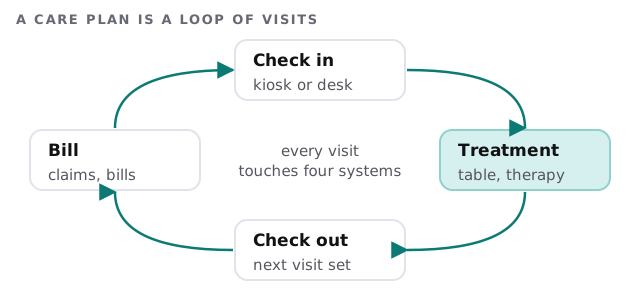
Managed IT services for chiropractic offices have to match a particular rhythm. Patients come in often, on a plan, and the day moves by the minute. Each visit passes through four steps, and each step has its own system.
What every visit touches
- Check in. A kiosk, tablet or the front desk confirms who’s here and pulls up the chart.
- Treatment. The provider updates notes and exam findings, sometimes at a computer in the treatment area.
- Check out. The next visit is booked and any payment is taken.
- Billing. Claims go to insurers, and statements go to patients.
Where a busy practice gets caught
- Shared front-desk logins. The desk is staffed by whoever’s free, and a single password gets passed along.
- Treatment-area computers. Screens facing patients, left signed in, with a provider two rooms away.
- Digital X-ray storage. Images sit on one PC with no tested backup.
- Check-in kiosks. A kiosk that shows other patients’ names is a leak. Decide what the screen displays.
- Payment plans and cards. Billing tools hold financial records beside clinical ones.
Who needs access to what
| Role | Needs | Doesn’t need |
|---|---|---|
| Front desk | Schedule, check-in, payments | Clinical notes beyond what the visit requires |
| Chiropractor | Charts, notes, imaging | Billing settings and user management |
| Billing staff | Claims, statements, ledgers | Imaging and treatment notes |
| Associate or locum | The charts of their own patients | The whole practice’s records, indefinitely |
| Practice owner | Reports and user management | A shared account used by everyone |
The point of the table isn’t to restrict people. It’s to make each account’s reach match its job, so a stolen password opens one door, not all of them.
A Tuesday morning
The first patient checks in at the kiosk, which shows a greeting and nothing else. The front desk confirms the appointment under her own login. In the adjusting room the chiropractor’s session timed out between patients, so the next person to walk in couldn’t see the previous chart. At midday the billing clerk notices a claim bounced and corrects it; the log shows who touched it and when. After close, the imaging server’s backup runs and sends a short report.
Nothing in that day is dramatic. That’s the standard we aim for.
If something goes wrong
HIPAA covers health care providers who transmit health information electronically in connection with covered transactions, which includes most offices that send claims to insurers electronically. The Breach Notification Rule then sets the clock. We explain it; we don’t certify an office, and the plan stays yours.
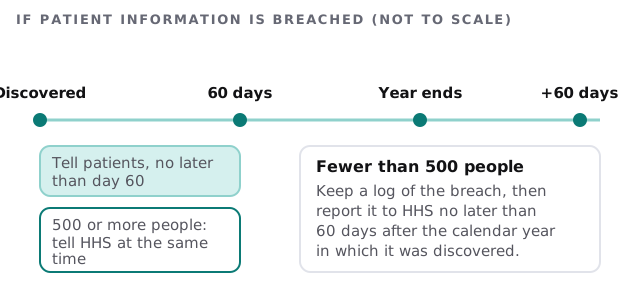
The notice to patients has to be in plain language. It describes what happened, what information was involved, what patients can do, what the office is doing and how to reach you.
Questions to ask a provider
- How do you handle a computer left signed in at a treatment table?
- Who can see our X-ray images, and how are they backed up?
- Can you show how our check-in kiosk limits what a patient sees?
- What logs do you keep, and how would you use them if there were a breach?
- What does our monthly care cover and what’s billed separately?
On the free IT check we go through these with you and send a plan and a fixed quote. A real person replies within 1 business hour, Monday to Friday, 9am to 5pm Pacific.
The most useful IT for a chiropractic office is boring: quick check-in, safe notes, and a backup you’ve tested.