Dark web monitoring for small business sounds like a service with a spooky name, but the idea is simple. Passwords get stolen from other companies’ databases, copied into forums and dumps, and tried against email accounts everywhere. Monitoring tells you when one of your people’s credentials turns up, so you can change it before someone uses it.
What a monitor can see
Be wary of anyone promising total coverage of the dark web. Nobody has it. Have I Been Pwned, the best-known public service, says plainly that it holds only a subset of all breaches, so an empty result doesn’t prove an account is safe. What monitoring does well is narrower and more useful: it reports confirmed exposures that touch your accounts.
- Breach lists of email addresses and passwords exposed by other companies.
- Paste sites where stolen data is dumped in the open.
- Stealer logs from malware on personal computers, which HIBP says it also includes.
Two free places to start
Have I Been Pwned
Anyone can search a single email address. For your whole business, domain search lets you see every breached address on your domain, but only after you’ve proved you control it. You can also subscribe to alerts. Notifications go to the monitored address only, so you can’t watch an address you don’t control.
Microsoft Entra, if you use Microsoft 365
Microsoft’s leaked-credentials detection watches dark web forums, breach dumps, paste sites and law enforcement seizure data. It then checks what it finds against your tenant’s current valid password hashes. A detection appears only on a confirmed match, and Microsoft rates it high risk for that reason. Microsoft lists it as available without the Premium (P2) licence, so check your own tenant to see what you can view.
Why password reuse is the real story
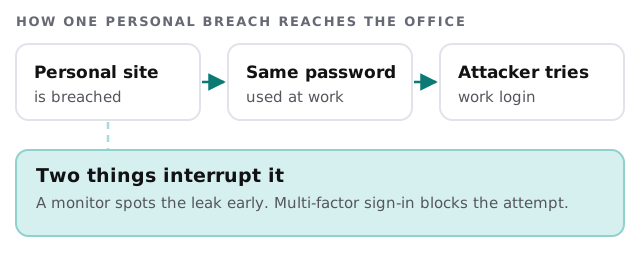
Most leaks that matter to a small business don’t involve your systems at all. They involve a staff member’s account on some unrelated site.
What an alert means, and what to do
| Alert says | Treat it as | First move |
|---|---|---|
| Your domain appears in a breach | An address or password of yours is public | Check which accounts and reset those |
| Microsoft flags leaked credentials | A confirmed match on a valid password | Reset the password, revoke sessions |
| An old account shows up | Probably a former employee or test login | Confirm it’s disabled |
| Nothing found | Nothing seen, not proof of safety | Keep other protections on |
The first hour
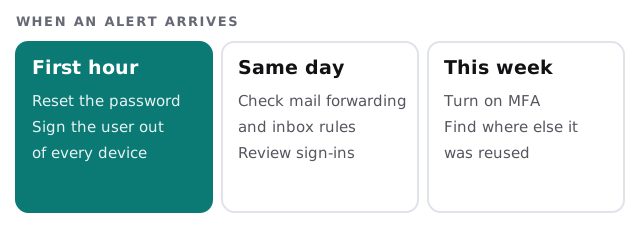
- Reset the password from your admin side, not by emailing the user a link to the account that’s affected.
- Sign the user out of every device, so a session already open elsewhere ends.
- Check mail rules. Forwarding to an outside address is the classic leftover.
- Look at recent sign-ins for places and devices the person doesn’t use.
- Find the reuse. If that password protects another account, change it too.
- Tell the person, kindly. A leak is rarely their fault.
What a good setup looks like
- Domain search done once and recorded, with alerts sent to a shared inbox.
- Built-in leaked-credential checks switched on where your platform has them.
- A named person who owns the response above.
- A password manager and multi-factor sign-in, so a leaked password is a smaller event.
What we need from you
- Admin access to your Microsoft 365 or Google Workspace account.
- Access to a domain email address, so the domain can be verified.
- A decision on who gets the alerts.
- A list of staff who’ve left in the last year, so we can check their accounts are off.
A leaked password is only dangerous while it still works. Monitoring is how you find out in time to change it.