Plenty of small businesses have tried an AI tool by now. Someone signed up, pasted a few things in, and it was impressive for a week. Then it drifted out of use, because nobody connected it to the real work. An AI implementation partner for small business exists to close that gap: less talk about what AI could do, more of one tool doing one job your team used to do by hand.
Partner, consultant, agency or software?
They all mention AI on their websites. What you walk away with is very different.
| AI consultant | Marketing agency | Software subscription | Implementation partner | |
|---|---|---|---|---|
| Main output | Recommendations | Campaigns and content | A product you configure yourself | A working tool inside your business |
| Who builds it | You, after the report | The agency, for its own work | You | We do, together with your team |
| Fits your exact process | Only if you build it to | Rarely the goal | You adapt to it | It’s built around it |
| What’s left when they go | A document | An ongoing retainer | A login | A tool your team runs on |
How we pick the first thing to build
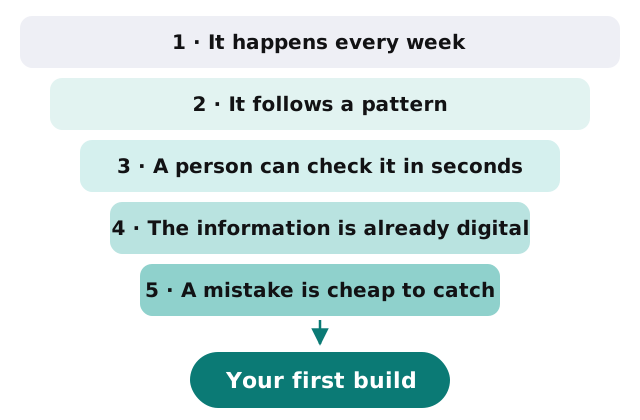
The first project sets the tone, so we’re strict about it. A good first build passes all five of these:
- It happens every week. Monthly chores don’t pay back fast enough to start with.
- It follows a pattern. If two people on your team would do it the same way, a tool can draft it.
- A person can check the result quickly. Reading a draft takes seconds. Redoing bad work takes hours.
- The information is already digital. Email, spreadsheets, accounting or practice software. Paper can come later.
- A mistake is cheap to catch. Early builds stay away from anything that moves money or makes promises to clients.
Tasks that usually pass: drafting answers to the questions clients ask every week, pulling details out of forms into a spreadsheet, chasing missing documents, turning call notes into follow-up emails.
How a project runs
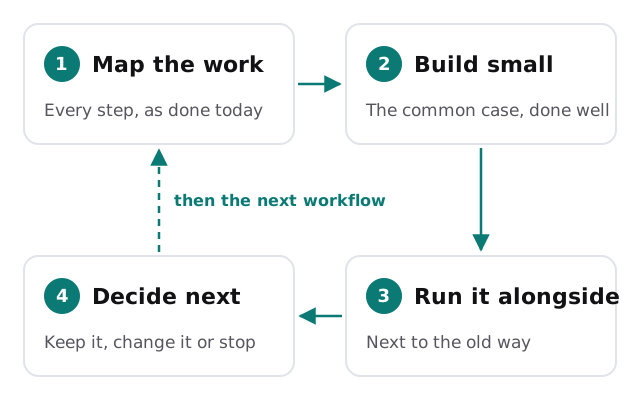
Map the work
We sit with the people who actually do the task and write down every step, including the ones nobody thinks of as steps, like checking a second screen or asking a colleague.
Build the smallest useful version
Not the version that handles every exception. The version that handles the common case well and hands everything else to a person.
Run it next to the old way
For a while, the tool drafts and a person still does the work, so you can compare the two. This is where trust is earned or lost.
Decide what comes next
If it saves real time, it becomes the normal way. If it doesn’t, we change it or stop, and you’ve lost little. Then we look at the next workflow on the list.
Guardrails we don’t skip
- Every AI service runs on a business account, not a personal one, so the vendor’s business data terms apply.
- Tools draft before they act. Permission to do more is earned, one task at a time.
- A log records what the tool did and who approved it.
- Sensitive client or patient information stays out until the vendor and the setup are right for it.
- A one-page plain-English note explains what each tool does, for whoever joins your team next.
Signs your business is ready
You don’t need a strategy or a data team. You need a recurring task that annoys people, a person willing to check the tool’s work for a few weeks, and the patience to start with one thing.
It also helps to know where the time goes today. If nobody can say which tasks eat the most hours, that’s fine; the free IT check asks exactly that, and the answer usually points straight at the first build.
Two of our guides help with the groundwork: choosing an AI assistant for your team and writing an AI use policy. Both are worth doing whether or not you ever work with us.
If you can describe the task in one sentence and your team groans every time it comes around, it’s probably a good first build.