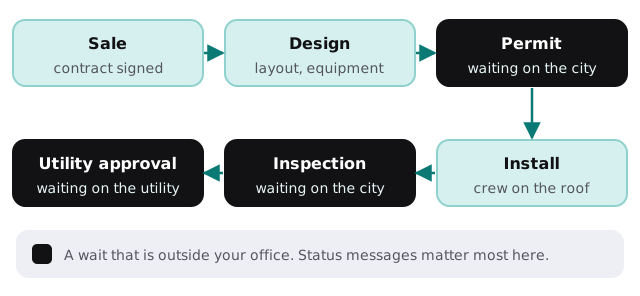
AI automation for solar companies is mostly about the stretch of a project that has nothing to do with panels. The sale is exciting, and the install is a day or two on the roof. In between, there are weeks of forms, reviews and waiting, and that is where homeowners start worrying and coordinators start copying details from one screen to another. We build small AI tools and internal tools that handle the copying and the status messages, while your people handle the judgment.
The long middle
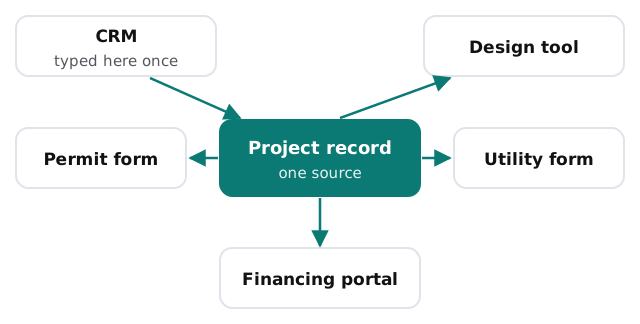
Type it once
A typical job needs the same facts in a CRM, a design tool, a permit application, a utility interconnection form and a financing portal. Every re-key is a chance for a typo that comes back as a correction request weeks later.
Assembling a permit packet
- Pull the facts. Address, owner, system size, equipment and roof details come from the project record.
- Match the jurisdiction. Each city or county asks for different documents. A tool keeps a checklist per jurisdiction that your coordinator maintains.
- Draft the cover sheet. It fills the form from the record and lists what is attached.
- Flag what is missing. A signature, a photo or an equipment sheet that has not arrived.
- A person submits. The coordinator reviews, files and logs the confirmation.
When a reviewer sends back comments, the tool lists them against the plan sheets so the designer sees what to fix.
Messages for the waiting weeks
A homeowner who signed a contract and then hears nothing for a month starts to wonder. Your team can set up status messages for each stage: what is happening, who it is waiting on and what the customer might be asked to do. The tool drafts the next message when a stage changes in your project tool, and a coordinator approves it. Anything about a delay, a change of equipment or money goes to a person untouched.
Sales, proposals and the first reply
| Moment | What goes wrong | What a tool drafts |
|---|---|---|
| New lead | The first reply is slow or generic | A reply that references the address and the inquiry |
| Site visit | Notes live in the rep’s phone | A clean visit summary and photo list |
| Proposal | Details copied from the design tool | A proposal draft for the rep to check |
| Post-sale | Customer asks “what’s next?” | A short next-steps note for the stage they are in |
A sales rep still explains savings. A tool does not state production estimates or incentive amounts, since those depend on design, utility rates and rules that change. Those come from your design software and the official sources.
After the system is on
Production dips, inverter alerts and warranty questions arrive in the same inbox as new leads. A tool can sort them: a monitoring alert goes to the service lead with the system details attached, a billing question goes to the office and a warranty claim gets a checklist of what to send. Service dispatch remains a human call.
The software around a solar company
You likely run a CRM, a design and proposal tool, a project management system, a permit and utility process that is part portal, part PDF, a financing platform and a monitoring dashboard. Some of these have exports or APIs, others do not. We map them before planning.
Calendar pressure
Install seasons follow weather and demand, and a surge of signatures can swamp a permit coordinator. Build the packet and status tooling in a slower stretch, so the busy one starts with it already working.
What we need from you
A recent project file with the documents it needed, your stage list and the systems you use. After the free IT check you get a plan and a fixed quote. A real person replies within 1 business hour, Monday to Friday, 9am to 5pm Pacific.
Customers do not mind a wait they understand. They mind silence.