AI automation for real estate offices is about the gaps between people: the agent who found the buyer, the coordinator who watches the dates, the broker who signs off on the file. Each hand-off is a chance for a date or a document to slip.
A brokerage runs on a handful of deadlines that can’t move. The rest is repeating the same words in different places.
From signed offer to closing
When a contract is signed, a handful of dates start running: inspection, appraisal, loan conditions and closing. They come from the contract itself, and in most offices they live in someone’s head and a calendar.
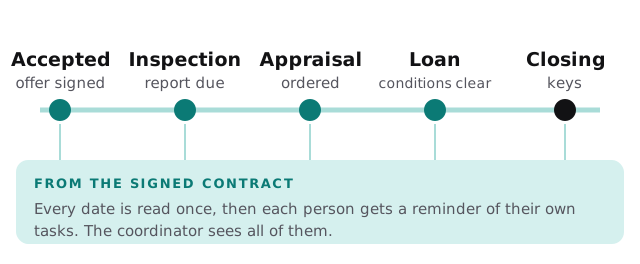
A tool reads the signed contract, pulls out each date and who it belongs to, and creates the reminders: the buyer’s agent for the inspection response, the coordinator for the appraisal, the lender contact for conditions. When a date changes through an amendment, the reminders move too. A person confirms the dates the first time, because a contract is only as readable as its scan.
Who does what
Three jobs worth a tool
Listing text that matches everywhere
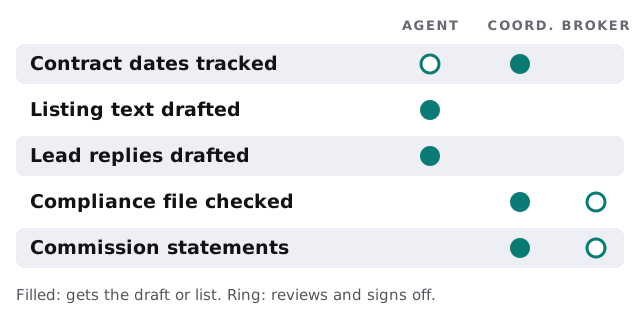
An agent enters a listing’s details once. The tool drafts the description for the MLS, the website, the flyer and a social post from the same facts, so the square footage and the bedroom count agree. The agent edits and approves each.
The first reply to a lead
A buyer fills in a form on a Saturday morning. A draft goes to the agent within a minute: a greeting, an answer to what they asked, the listing details, and two times to see it. The agent reads it on their phone and sends it. The lead gets a prompt human reply, and the agent hasn’t opened a laptop.
The file check before closing
The coordinator’s checklist is mostly “is this document here, signed and dated?” A tool can read the transaction folder and list what’s missing before the broker’s review. It doesn’t judge compliance. It makes sure the person who does has a complete file in front of them.
The software it works beside
| Category | Common examples | The gap a tool fills |
|---|---|---|
| CRM for leads | Follow Up Boss, kvCORE | Drafts replies, logs the activity |
| Transaction management | Dotloop, SkySlope | Reads dates, flags missing documents |
| MLS and listing sites | Your local MLS | Keeps copy consistent with your records |
| E-signature | DocuSign and similar | Chases unsigned documents |
| Accounting | QuickBooks and similar | Prepares commission statements for review |
We make no claim of working with any particular product. What we check on the free IT check is what yours allows.
Seasons
Spring is listing season, and the same office that is quiet in January can have every agent writing offers in April. Put new tools in during the slow weeks, and start with one agent or one team before the whole office. Agents are often independent, so adoption works better when the first user reports back to the others in plain terms: what it saved, what it got wrong, what to change. Offices that ask every agent to switch on the same day usually get a lot of shrugs.
Do first
- Pick the deadline that scares you. Usually the one that has already been missed once.
- List the five forms you retype most.
- Name one agent who will try it first.
Then send us the list. We return a plan and a fixed quote, and a real person replies within 1 business hour, Monday to Friday, 9am to 5pm Pacific.
The most expensive thing in a brokerage is a date that nobody was watching.