AI automation for private schools has an unusual feature: the busiest administrative months have little to do with the school day. Teachers and students are at their steadiest in October. The office, meanwhile, is answering tour requests, building next year’s roster and chasing contracts, all at once.
We build small AI tools and internal tools for the office. A person at your school approves what families receive.
A school year in two halves
Think of two calendars running at the same time. One is the academic year your teachers live in. The other is the enrollment year, which starts with tours in the fall, moves through applications and decisions in winter and spring, and ends with contracts and the August welcome.
Five places families stall
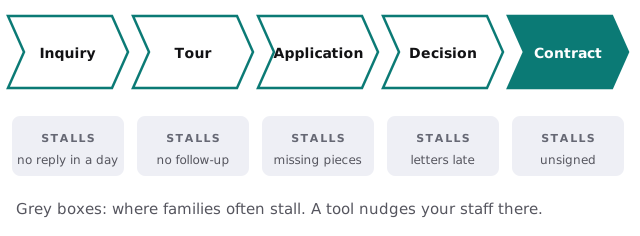
An admissions inbox mixes brand-new inquiries with a family waiting on a financial aid answer. A tool can read each message, work out the stage from your records and draft a reply for the admissions director to adjust. Families who toured last week and went silent are listed, with a short follow-up draft that mentions what they asked on the tour.
Admissions, step by step
- Capture. An inquiry form or email becomes a record with grade level, siblings and the tour interest.
- Reply. A personal draft goes out the same day for approval.
- Remind. After a tour, an application checklist and a thank-you are prepared.
- Track. Missing recommendations or transcripts are listed by family.
- Close. Decision letters and contracts are drafted from your templates, for the head to review.
Re-enrollment season
Re-enrollment is a clock the school sets itself. Contracts go out with a date, deposits follow, and every family that hasn’t answered is a seat your admissions team can’t plan around. A tool lists families by status, drafts a friendly reminder in the voice of the person they know and shows the business office which deposits have arrived.
| Moment | The usual snag | A tool’s part |
|---|---|---|
| Contract sent | Family misses the email | A second message after a quiet week |
| Aid decision pending | Parents unsure of the next step | A plain-language status draft |
| Deposit due | Business office checks by hand | A list of who has paid |
| Family leaving | Found out in August | An early flag from a gap in replies |
One inbox, many desks
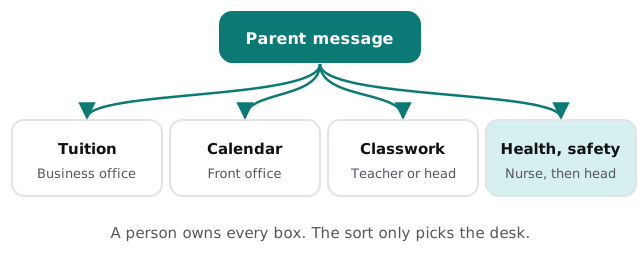
The front office receives everything: the field-trip form, the tuition invoice, a worry about a friend and a note that a student is sick. Sorted by topic, each reaches the person who should answer. Messages that mention health, safety or a child’s distress go to a person first and flagged as such.
The software around a school
- Student information system: rosters, schedules, grades, attendance.
- Admissions and enrollment management: inquiries, applications, decisions.
- Tuition and aid management: billing, plans, aid forms.
- Learning management system: assignments and materials.
- Parent communication: newsletters, texts, calendars.
Student information is sensitive. We plan tools to use as little of it as the job requires and write down what each tool can see.
A Tuesday in February
The admissions director opens a list: nine families to follow up after tours, three applications missing a recommendation, and a financial aid question that has waited two days. Each has a draft. She edits three, sends all of them and spends the rest of the morning on the visit she’d been postponing.
Questions to ask any provider
- Which fields about students will the tool ever read?
- Can the sort be turned off for a category of messages?
- Who reviews the drafts, and can I see what changed?
- What happens at the end of a contract?
What we need from you
A rough map of your enrollment calendar, a sample of family emails with names removed and the systems you use. After the free IT check we return a plan and a fixed quote. A real person replies within 1 business hour, Monday to Friday, 9am to 5pm Pacific. Before any tool touches a family’s information, write an AI use policy for your small business gives your board something concrete to approve.
Families judge a school by how it treats them in the weeks before they’ve paid anything. A small tool can make those weeks feel looked after.